For Accountants or ProAdvisors who are on a PAP (ProAdvisor Program) software bundle:
Sign in to camps.intuit.com.
For Accountants or ProAdvisors who are on a PAP (ProAdvisor Program) software bundle:
Sign in to camps.intuit.com.
https://en.wikipedia.org/wiki/Power_over_Ethernet
IEEE 802.3
Passive POE used 24V while Active POE uses 48V.
PD = Powered Device / PSE = Power Sourcing Equipment
| Type 1 | Type 2 | Type 3 | Type 4 | |
| Common Name | PoE | PoE+ | PoE++ / 4PPoE | PoE++ / 4PPoE |
| IEEE Doc | 802.3af | 802.3at | 802.3bt | 802.3bt |
| Max Power PD | 12.95w | 25.5w | 51w | 71.3w |
| Max Power PSE | 15.4w | 30w | 60w | 90w |
| V range @PSE | 44-57v | 50-57v | 50-57v | 52-57v |
| V range @PD | 37-57v | 42-57v | 42-57v | 41.1-57v |
| Max Amps | 350mA | 600mA per Pair | 600mA per Pair | 690mA per Pair |
| Supported Cabling | CAT 3 & 5 | CAT5 | CAT5 | CAT5 |
In certain situations you might want to add a user without a license, like an admin. To add a user without a license you need to do the following:
Add free service
Turn off Auto-Assign of Licensing
If your Windows 10 computer was installed using the old MBR(Mater Boot Record) and you are trying to migrate your installation to a new computer or you are trying to upgrade to Windows 11, you can convert your MBR to at GPT partition. This link tells you how. https://learn.microsoft.com/en-us/windows/deployment/mbr-to-gpt
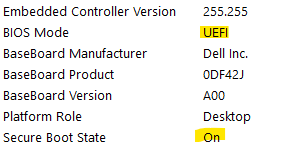
To check if your installation of Windows 10 is ready, run MSINFO and look for BIOS Mode. If it says UEFI then you are all set, but if it says Legacy then you need to convert you partition style from MBR to GPT.
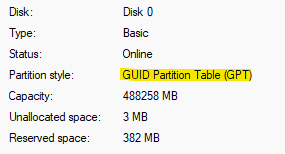
You can also check by opening Disk Management, right click on the drive at the bottom of the screen and select Properties, click on the Volume tab. If it say GPT you are all set, if it says MBR you need to convert your patition.


2. Now we need to boot into the BIOS and make sure that BOOT mode from Legacy to UEFI compatible and possibly turn on Secure Boot. If the computer boots up open MSINFO and check that BIOS MODE says UEFI and SECURE BOOT STATE says ON. See image at top of page
If you get an error 0x00000000 then try the following command
mbr2gpt /convert /disk:x /map:222=ebd0a0a2-b9e5-4433-87c0-68b6b72699c7
(https://community.spiceworks.com/t/mbr2gpt-conversion-0x00000000-error/718670/8)
 PC Paramedic-Computer Log