If your Windows 10 computer was installed using the old MBR(Mater Boot Record) and you are trying to migrate your installation to a new computer or you are trying to upgrade to Windows 11, you can convert your MBR to at GPT partition. This link tells you how. https://learn.microsoft.com/en-us/windows/deployment/mbr-to-gpt
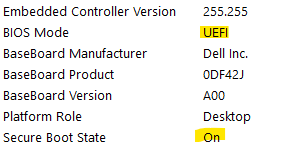
To check if your installation of Windows 10 is ready, run MSINFO and look for BIOS Mode. If it says UEFI then you are all set, but if it says Legacy then you need to convert you partition style from MBR to GPT.
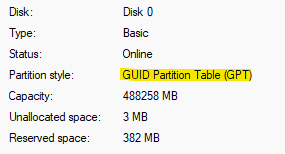
You can also check by opening Disk Management, right click on the drive at the bottom of the screen and select Properties, click on the Volume tab. If it say GPT you are all set, if it says MBR you need to convert your patition.
- Convert your system using MBR2GPT.
You can run this from booting off of a Windows 10 or 11 USB driver or from a live Windows install.- Just in case there are multiple drives in your computer we can specify the drive in the conversion process. Open a Command Prompt and run DISKPART, type LIST DISK. Make note of the disk number of the OS Drive.
- From a Windows PE USB, the MBR2GPT utility is located in the Windows\System32 directory. Run MBR2GPT /VALIDATE /DISK:x. If everything is OK it should look like this.
- Just in case there are multiple drives in your computer we can specify the drive in the conversion process. Open a Command Prompt and run DISKPART, type LIST DISK. Make note of the disk number of the OS Drive.

- Now lets convert the partition from MBR to GPT. At the command prompt run MBR2GPT /CONVERT /DISK:x. If it worked it should look like this.

2. Now we need to boot into the BIOS and make sure that BOOT mode from Legacy to UEFI compatible and possibly turn on Secure Boot. If the computer boots up open MSINFO and check that BIOS MODE says UEFI and SECURE BOOT STATE says ON. See image at top of page
If you get an error 0x00000000 then try the following command
mbr2gpt /convert /disk:x /map:222=ebd0a0a2-b9e5-4433-87c0-68b6b72699c7
(https://community.spiceworks.com/t/mbr2gpt-conversion-0x00000000-error/718670/8)