OneDrive Updates/Release Notes
Reply

MAC address filtering is applied to the port of a Ubiquiti switch. You need to enter every MAC address on that port. It is not applied to all ports. It is not available on ports of most Ubiquiti gateways and not all Ubiquiti switches have this option. Since you are entering all the MAC addresses on one port of the Ubiquiti switch you need to connect another switch to that port you just configured.
!!! There is one problem with this feature that is not listed in the documentation, you can only filter 20 MAC addresses per port !!! No matter what Ubiquiti switch you purchase this is the limitation.
https://help.ui.com/hc/en-us/articles/18565355579799-MAC-Address-Restricting
The only way to filter more more than 20 MAC addresses is to use the RADIUS server. Follow this link for the instructions on how to do it. https://help.ui.com/hc/en-us/articles/115004589707-MAC-Based-VLAN-Assignment-Using-802-1x-in-UniFi-Network
Open Task Manager, click on Performance, click on Memory. Right below the work Memory does it only list 2gigs of RAM? At the top right of the big graph it should list how much ram you have installed. Look lower down, at the bottom right it should say “Hardware reserved”. If you are having this problem then the number should be in the GBs. Normally this number is in the MB. Mine said 10gig, which is crazy.
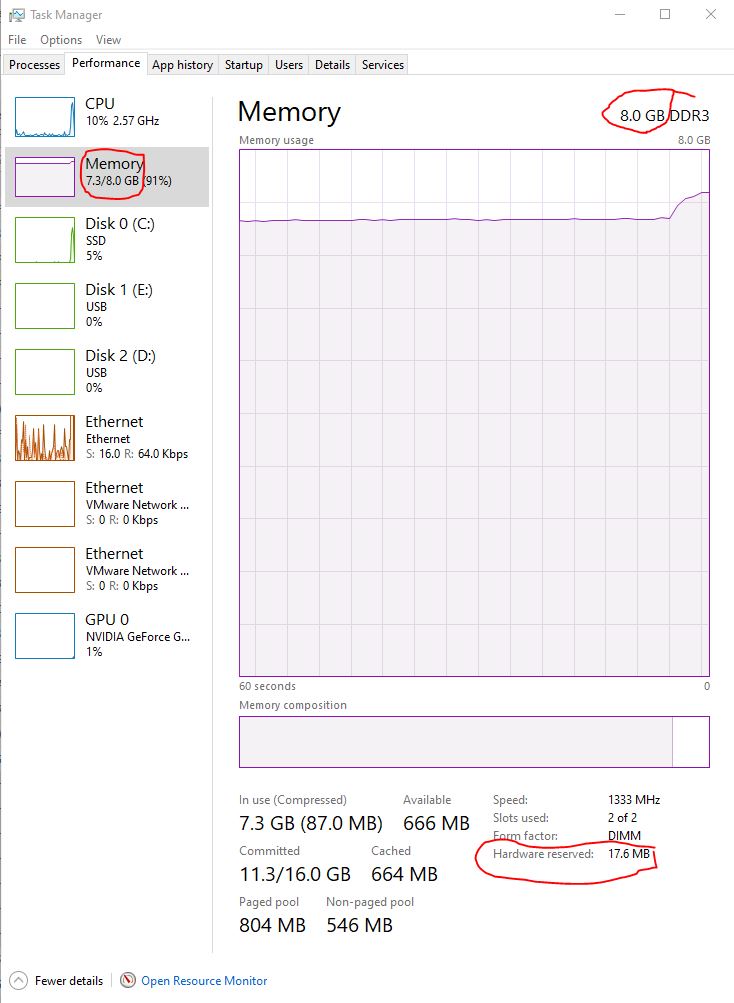
Solution
My problem started when I had to reinstall a Dell computer from the built in Dell recovery option. I checked the BIOS and there was no setting to reserve 10gigs of RAM. It turned out that Microsoft Windows was the problem. After the reinstallation of Windows it didn’t Activate automatically. Once I activated Windows and restarted the computer I had full use of all my RAM.
To activate Windows, click Start, Settings, Update & Security, Activation, click Troubleshoot.
 PC Paramedic-Computer Log