I am computer technician and have been working in the field for over 25 years. I grew up with computers at home and we had them before my school had any.
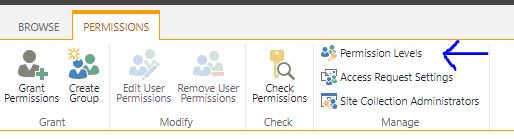
For existing users, edit the permissions of those in the current list by selecting the check boxes and clicking either Edit User Permissions or Remove User Permissions.
For new users, click Grant Permissions and fill out the dialog box. Make sure you click Show options and select the appropriate permission level.
.TEXT gets the formatted value of a cell. Actually what it looks like. So if the column with is too small and the numbers don’t fit then it will return “#####”. This also is the slowest in retrieving the contents of the cell than .VALUE or .VALUE2
.VALUEcan damage numbers. If the cell is formatted as a date or currency then Range.Value converts the underlying double-precision value into a VBA date or currency variable before passing it to the VBA variable used in the assignment statement. Since VBA currency only has 4 decimal places this can cause a loss of accuracy. Then when you assign the VBA currency or Date variable to a cell using .Value, it rounds the value to 2 decimal places regardless of cell formatting. ALSO There is a problem using .Value to get a date and passing it to VLOOKUP.
.VALUE benefit – Using .Value to retrieve cells formatted as dates into a variant is useful because then you can use IsDate() to detect that the cell was a date.
.VALUE2 – This works the same way as Range.Value, except that it does not check the cell format and convert to Date or Currency. And that’s probably why its faster than .Value when retrieving numbers.
Writing VBA code to access things outside of Excel
This is not explained at most websites, that to write certain types of VBA code requires you to turn on a reference to that Library of special coding. For example, to be able to write VBA code to communicate with external programs like Adobe, Apple QuickTime, Crystal Reports, Dropbox and more, you need to link a library of code to the VBA editor. But this doesn’t only apply to external programs! If you want to write code to automate the importing and exporting VBA Modules in Excel, you need to do the following 2 things in Excel: 1) in the Excel VBA editor click Tools, References, and put a check in “Microsoft Visual Basic for Applications Extensibility 5.3”, and 2) in the main Excel window press ALT-T-M-S and put a check in “Trust access to the VBA project object model”.
With ActiveSheet.Sort
     .SortFields.Add Key:=Range("A1"), Order:=xlAscending
     .SortFields.Add Key:=Range("B1"), Order:=xlAscending
     .SetRange Range("A1:C12")
     .Header = xlYes
     .Apply
End With
TIP – if the range changes you can use this to solve that problem. Range(“A1”, Range(“A1”).End(xlDown)).Sort Key1:=Range(“A1”), Order1:=xlAscending, Header:=xlNo
Difference between worksheet.select and worksheet.activate
What the above statement will do that is it will delete the row for the given row. For example, if we write Range(“A1”).EntireRow.Delete then the first row will be deleted as cell A1 belongs to the first row.
You need to use the Userinterfaceonly attribute with the Worksheet.Protect command like so: Worksheet.Protect “1234”, userinterfaceonly:=True This needs to be run every time the Excel file is opened



 PC Paramedic-Computer Log