Open Task Manager, click on Performance, click on Memory. Right below the work Memory does it only list 2gigs of RAM? At the top right of the big graph it should list how much ram you have installed. Look lower down, at the bottom right it should say “Hardware reserved”. If you are having this problem then the number should be in the GBs. Normally this number is in the MB. Mine said 10gig, which is crazy.
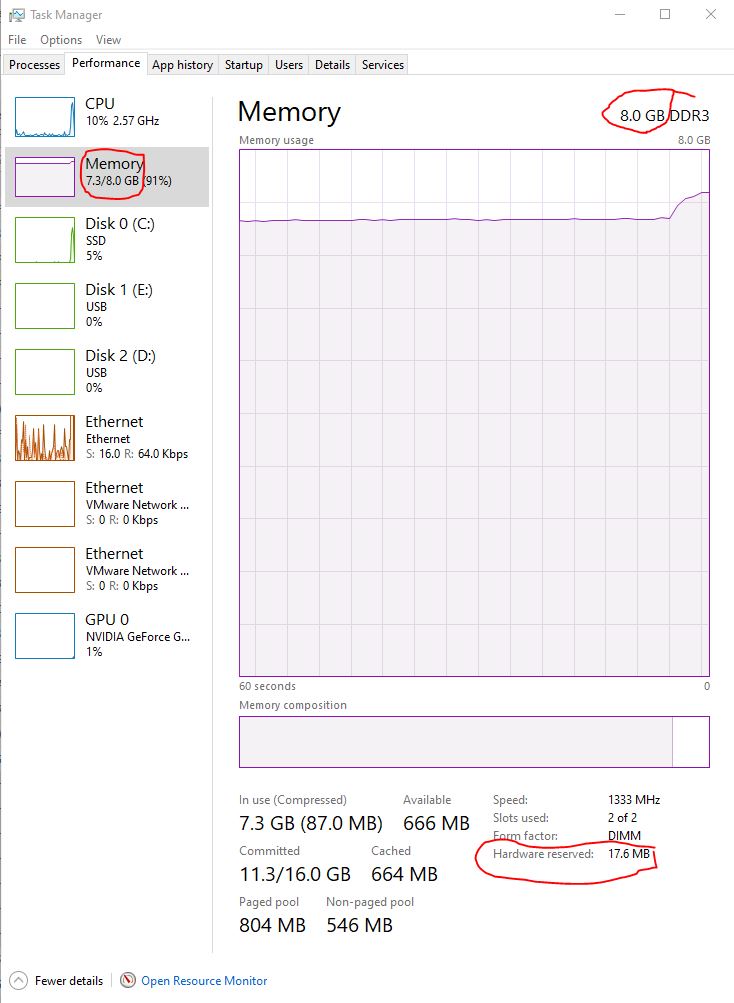
Solution
My problem started when I had to reinstall a Dell computer from the built in Dell recovery option. I checked the BIOS and there was no setting to reserve 10gigs of RAM. It turned out that Microsoft Windows was the problem. After the reinstallation of Windows it didn’t Activate automatically. Once I activated Windows and restarted the computer I had full use of all my RAM.
To activate Windows, click Start, Settings, Update & Security, Activation, click Troubleshoot.
 PC Paramedic-Computer Log